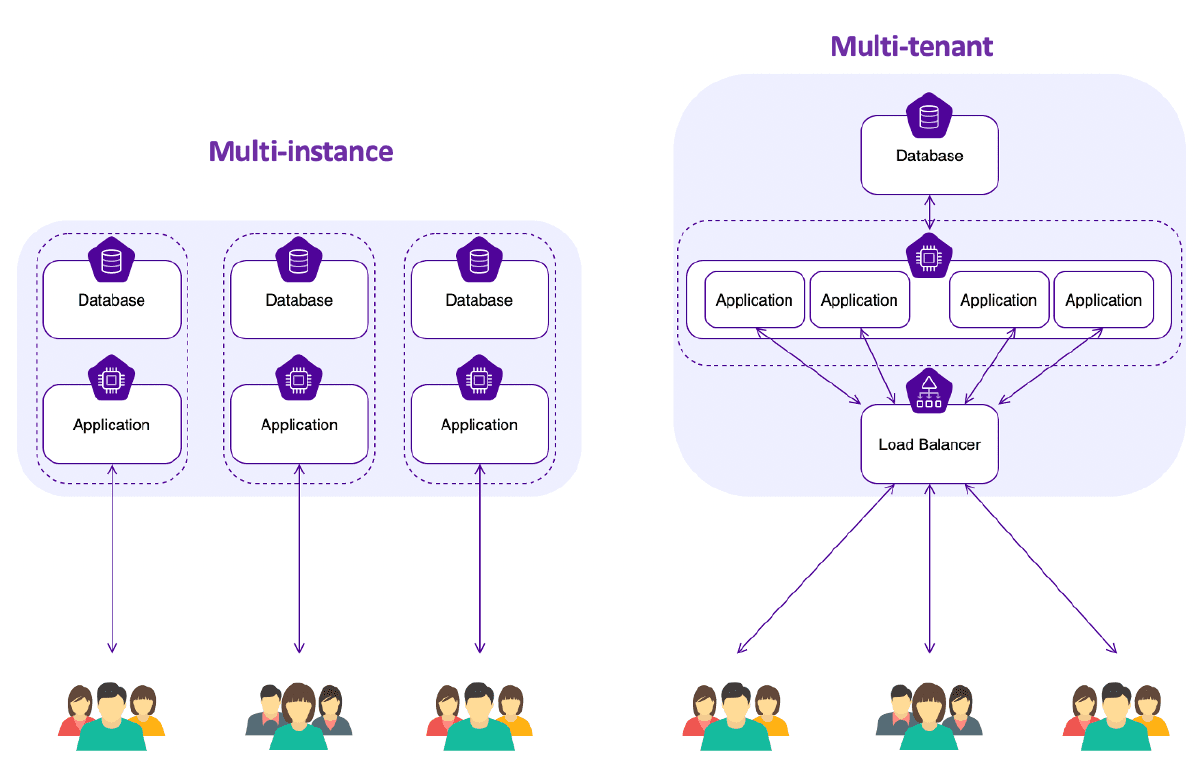

Single-Tenant vs Multi-Tenant SaaS Architectures#
The two main ways to deploy SaaS: give each customer their own instance (single-tenant, multi-instance), or run everyone on one shared instance (multi-tenant, single-instance). Each has clear trade-offs around security, cost, and operational complexity.
Infrastructure Design#
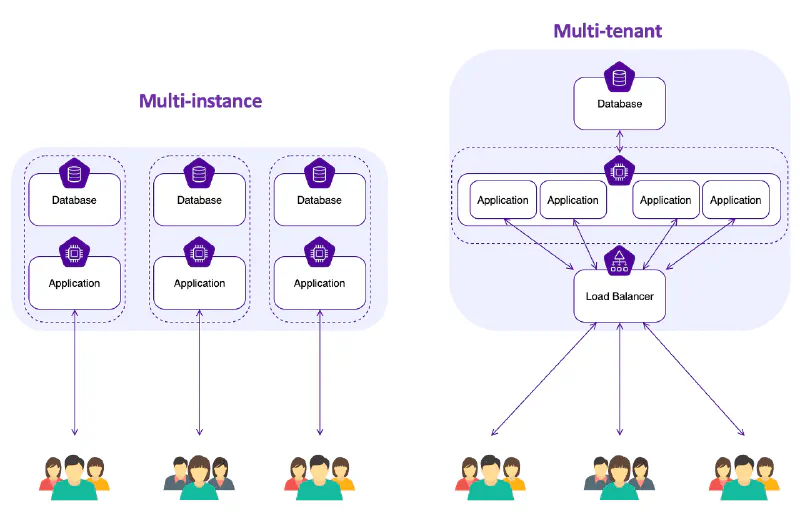
Single Tenant, Multi-Instance#
Benefits#
- Enhanced Security: Isolated environments prevent data breaches and unauthorized access.
- Customization: Tailored configurations for each tenant.
- Scalability: Independent scaling of instances.
- Performance: Dedicated resources ensure consistent performance.
- Fault Isolation: Issues in one instance don’t affect others.
- Compliance: Easier regulatory compliance due to data isolation.
- Maintenance: Reduced downtime due to independent maintenance.
- Cost Efficiency: Optimized costs based on individual tenant usage.
General Challenges#
- Resource overhead, complexity in management, and data synchronization issues are some of the challenges.
- Scaling, isolation, and cost management require meticulous planning.
Multi Tenant, Single Instance#
Benefits#
- Resource efficiency, simplified management, and scalability are key advantages.
- Data consolidation, consistent updates, and improved security benefit all tenants.
General Challenges#
- Addressing performance isolation, customization limitations, and data security are critical.
- Scalability bottlenecks and maintenance strategies need careful consideration.
Learn more about SaaS Solutions - Multi-instance vs. Multi-tenant Architectures
Where to start for single-tenant?#
If you’re going the single-tenant route, here are the tools that make it manageable:
Containerization and Orchestration Tools (e.g., Docker, Kubernetes):
- Docker: Helps package your application and its dependencies into a container, ensuring consistency across various development and deployment environments.
- Kubernetes: Assists in automating deployment, scaling, and operations of containerized applications, making it easier to manage single-tenant applications across various environments.
Infrastructure as Code (IaC) Tools (e.g., Terraform, AWS CloudFormation):
- These tools allow you to define and provision your cloud resources using code, which can be particularly useful for managing separate infrastructure stacks for each tenant.
Serverless Frameworks (e.g., AWS Lambda, Azure Functions):
- Serverless computing can simplify the deployment of single-tenant applications by abstracting the server layer, allowing developers to focus on individual functions or services without worrying about the underlying infrastructure.
CI/CD Tools (e.g., Jenkins, GitLab CI/CD):
- Continuous integration and continuous deployment tools help automate the testing and deployment of your application, which is crucial for maintaining the individual instances of a single-tenant application.
Configuration Management Tools (e.g., Ansible, Chef, Puppet):
- These tools help in automating the software configuration and deployment process, ensuring that each tenant’s environment is set up consistently and according to best practices.
Cloud Service Providers (e.g., Pulumi, Azure, Google Cloud Platform):
- Most cloud providers offer services that can be leveraged to host and manage single-tenant applications, providing scalability, security, and reliability.
Monitoring and Alerting Tools (e.g., Prometheus, Grafana, New Relic):
- Monitoring each tenant’s instance is crucial for ensuring performance and availability. These tools can provide insights into your application’s health and help you proactively address issues.
Database Management (e.g., Amazon RDS, Azure SQL Database):
- Efficient database management is key in single-tenant architectures, where each tenant may have their own database. Managed database services can help ease the burden of database administration and scaling.
Identity and Access Management (IAM) Tools (e.g., Auth0, Okta):
- Securing each tenant’s data is paramount in a single-tenant SaaS. IAM tools can help manage user identities and control access to resources in a secure and scalable manner.
Development Frameworks and Libraries:
- Depending on the programming language you’re using, there are likely frameworks and libraries designed to help with SaaS application development, which can be leveraged for single-tenant architectures as well.
Pick the tools that match your scale and team size. You don’t need all of these on day one—start with containerization and IaC, and add monitoring and IAM as you grow.